Austin Bailey Font Review
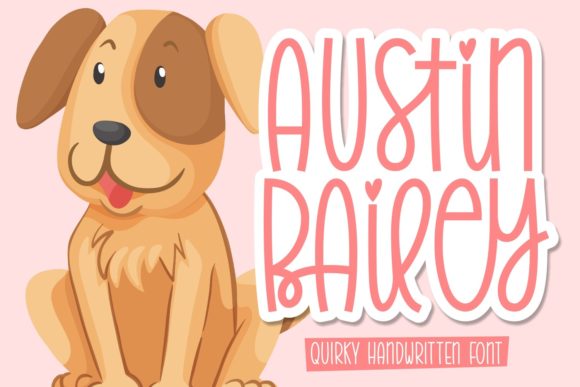
As a web designer, I’m always on the lookout for fonts that bring personality to a site without sacrificing readability. Austin Bailey has quickly become one of my go-to choices for headers and decorative elements. It’s a simple, thin lettered handwritten font that feels both modern and approachable—perfect for brands that want to feel authentic and creative.
Testing Austin Bailey in a Hero Section
I first tested Austin Bailey in a hero section for a boutique online store. The font’s soft curves and light weight gave the page a warm, inviting feel. I used it for the main headline, paired with a clean sans serif for the subtext. The contrast was just right—Austin Bailey added character without overpowering the design. On mobile devices, it remained legible and didn’t get lost against the background image. It felt like a breath of fresh air in an otherwise minimal layout.
Using Austin Bailey for Call-to-Action Buttons
Next, I tried Austin Bailey on a call-to-action button for a course sales page. The font’s hand-drawn quality made the button feel more personal and engaging. It worked well for short phrases like “Join Now” or “Start Today.” However, I noticed that when the text got too long, the letters started to feel cramped. For buttons, I’d recommend keeping the copy concise and using a bold weight if available. It’s a great choice for small touches but not ideal for lengthy CTA text.
Pairing Austin Bailey with a Clean Sans Serif
One of the strengths of Austin Bailey is how well it pairs with other fonts. I often use it alongside a simple sans serif for body copy. This creates a nice balance between creativity and clarity. The handwritten style adds a human touch, while the sans serif keeps the design professional and easy to read. It’s especially effective for websites that need to feel both artistic and functional.
Applying Austin Bailey to Landing Pages
For a product landing page, I used Austin Bailey as the main heading. It stood out beautifully against a dark background, giving the page a stylish and modern look. I also experimented with placing it over an image banner. The font’s thin strokes allowed the background to show through without being distracting. It worked well in both light and dark themes, making it a versatile choice for different design directions.
Readability on Mobile Devices
Mobile responsiveness is crucial for any website, and Austin Bailey held up surprisingly well. On smaller screens, the font remained clear and legible, even at smaller sizes. I tested it on a few different devices and found that it didn’t lose its charm. It’s important to keep the text size large enough, though—especially for navigation menus or form labels. For those areas, a more traditional font might be better suited.
When Not to Use Austin Bailey
While Austin Bailey is a great display font, it’s not the best choice for long paragraphs or dense content. I tried using it for a blog post, and the thin strokes made it hard to scan. It’s better suited for headlines, logos, and short phrases. If you’re designing a site that requires a lot of body text, you’ll want to pair it with a more readable font. Also, avoid using it in accessibility-heavy interfaces or for technical instructions where clarity is key.
Font Pairing for Web Design
When working on a brand identity, I often use Austin Bailey as a secondary font. It pairs nicely with both serif and sans serif fonts depending on the tone of the site. For a more editorial feel, I might pair it with a classic serif. For a modern, clean look, a simple sans serif works best. The font’s versatility makes it a valuable addition to any digital toolkit.
Checking Font Licensing and File Formats
Before integrating Austin Bailey into a project, I always check the licensing details. It’s important to make sure the font is properly licensed for commercial use, especially if you’re building a site for a client. I also look at the file formats available—webfont versions are essential for smooth performance. The font includes alternates and ligatures, which can add a nice touch to custom designs. These features are especially useful for creating unique logos or branding assets.